View and skin variety
MEC ships a large library of calendar skins and layouts. Sites that want many visual options out of the box get real choice.
Comparison
MEC wins on the sheer variety of calendar skins and layouts. Eventonomy plays a different game: a free plugin with RSVPs, waitlists, recurring events, and frontend submission, plus blocks that inherit your theme instead of a fixed skin.
Feature by feature
| Feature | Eventonomy | Modern Events Calendar |
|---|---|---|
| Price of entry | Free plugin; Pro from $99 per year (see store for current pricing) | Free Lite version from the vendor site, no longer on wordpress.org, as of October 2026; Pro sold separately, with some features as add-ons |
| Recurring events | Daily, weekly and monthly series free; yearly and "second Saturday" rules in Pro | Recurring events are supported |
| RSVPs | Going, maybe, and no with guest counts and questions, free | RSVP and booking arrive in the Pro tier |
| Waitlist | Free; capacity caps hand overflow to the waitlist | Booking limits exist; waitlist depends on the version |
| Paid ticketing and gateways | Pro checkout via Stripe, PayPal, or WooCommerce, with door check-in | Booking and tickets in Pro, with gateways such as PayPal, Stripe, and WooCommerce |
| Per-ticket fees | None, ever; you pay only your gateway | None; costs come from plugin and add-on licenses |
| Frontend submission | Free, with the Manage Events dashboard at /manage-events/ | Community event submission is listed under Lite on the vendor page |
| Views and skins | Grid, List, Month, and Upcoming free; Pro adds Week and Day | A large library of calendar skins and layouts is its signature strength |
| Output model | Native WordPress blocks that inherit your theme styles | Custom post types with shortcode, block, and widget output |
| Data architecture | Own database tables, full REST API, Interactivity API blocks | Custom post types with post meta; display-configuration heavy |
| Translations | Ships in English with 6 translations plus RTL support | Translation-ready with RTL support |
MEC details reflect their public free and paid lineup as of July 2026, except rows dated otherwise, and can change. Verify current packaging and pricing on their site.
Credit where due
A comparison you can trust names the other side's real strengths. Here are theirs.
MEC ships a large library of calendar skins and layouts. Sites that want many visual options out of the box get real choice.
Years of development mean a broad set of display and booking options, with settings for almost every layout detail.
It is a widely used calendar plugin, so there are plenty of live examples, tutorials, and third-party tips.
The verdict
Video
In depth
Pick Modern Events Calendar if the way your calendar looks is the product. Its vendor describes dozens of layouts and skins, and nothing we ship comes close to that range. Pick Eventonomy if the work that matters starts after someone finds an event: the RSVP, the capacity limit, the waitlist, the reminder, and members who add their own events. Eventonomy also gives you paid tickets in Pro, but the free plugin is built around sign-ups, not skins.
That is the whole decision in two lines. The rest of this page shows how each plugin handles the jobs people search for: what is free, how repeating events work, RSVPs and waitlists, tickets and payments, registration questions, check-in, community fit, and what moving over really involves. We also say who should stay where they are, because for some sites that is the right answer.
Modern Events Calendar is built around choice of look. The vendor’s own site talks about dozens of layouts, plus slider, daily, weekly and monthly views, and it presents the free Lite download and the Pro booking module side by side.
Here is how the same job, a public calendar on an Events page, goes in each.
On Modern Events Calendar you install the plugin, pick a skin, configure its options, then place it through a shortcode, a block or a widget. Each skin has its own settings. That is how you get the variety, and it is also why two people can set up the same plugin and end up with very different pages.
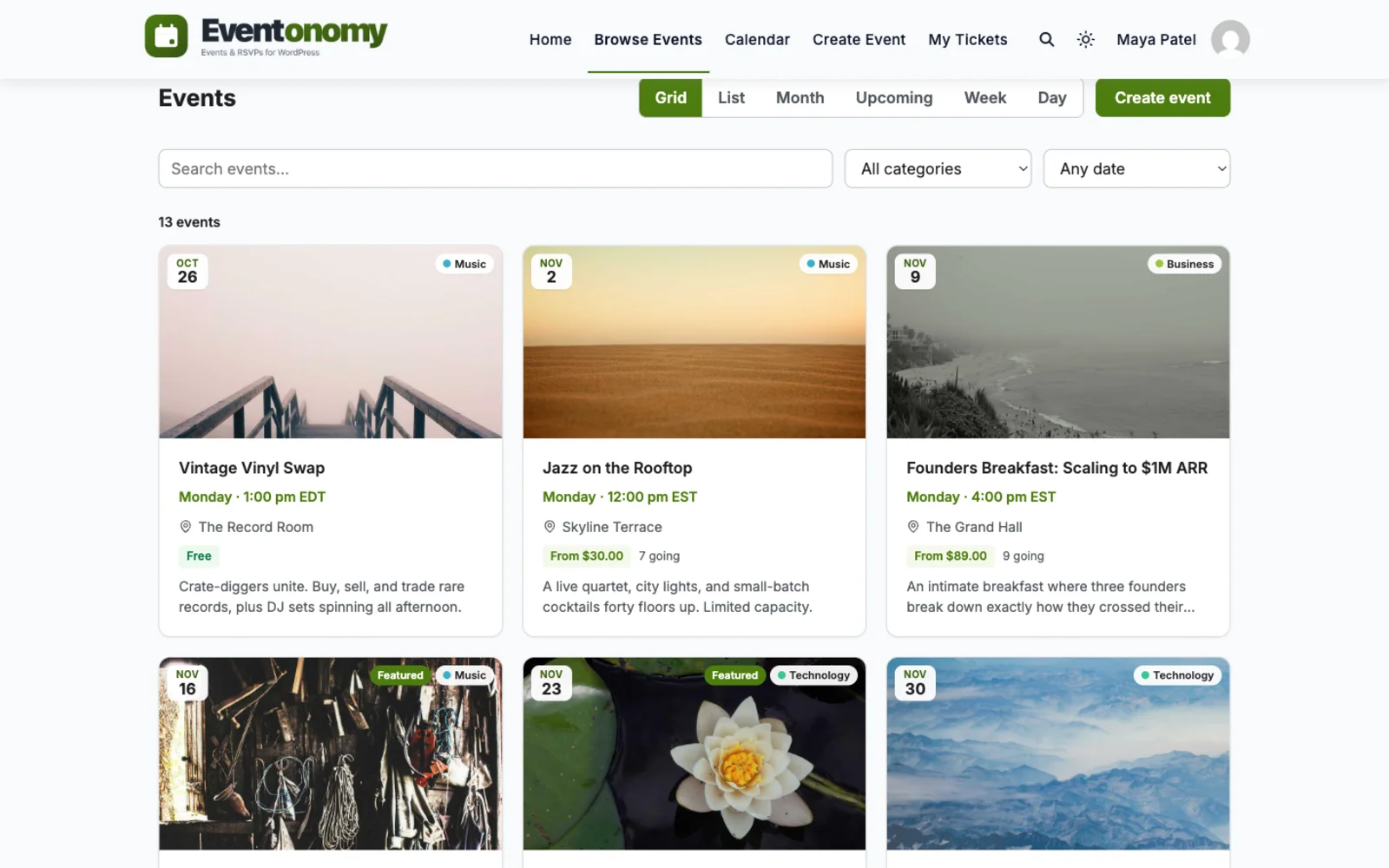
On Eventonomy you add a calendar block or an events-list block to a page and choose a view. Month, grid, list and upcoming are in the free plugin, and week and day grids are in Pro. The blocks inherit your theme’s fonts and colours, so there is less to style. There is also less to choose from, and we would rather say that plainly than call it a feature.
Open your current calendar on a phone. If the skin you chose is the reason people love your site, keep it. If you picked it because it was the default, a theme-matching block will probably look more at home.
Picture a music venue. The calendar is the front page, the posters matter, and visitors browse by week or by genre. A gallery of layouts earns its keep there, and Modern Events Calendar is a sensible choice.
Now picture a running club, a church group or a school. The calendar is a list people glance at on the way to the sign-up. What matters is that the Thursday session fills at twenty, the twenty-first person lands on a waitlist, and everyone gets a reminder. Skins are a distraction. That is the site Eventonomy is built for. Many sites sit in between, which is why the sensible next step is a test on staging, not a guess.
Going by the vendor’s own pages, there is a free Lite edition and a Pro edition. The Lite listing on wordpress.org is closed and says it is not available for download, so the vendor points you to its own site for the free download. That is not a problem in itself, but updates then come from the vendor and not the plugin directory, so find out how your site learns about new versions before you rely on it.
On what sits where, we read the vendor’s page. It lists single, multi-day and recurring events, several views, and community event submission under Lite. It lists advanced booking and ticketing, appointments and location layouts under Pro. Add-ons cover tickets and invoices, seat selection, Zoom and Webex, and single-event builders for Elementor and Divi. Editions change, so check the vendor’s page for the current split before you plan around any one line.
Eventonomy splits things in a simpler way. The free plugin holds events, venues and organizers, the calendar views above, recurring series, RSVPs, the waitlist, custom registration questions, reminders, an ICS feed and member submission. Pro adds paid tickets and checkout, tax, booking fees and coupons, week and day grids, maps, door check-in, analytics, discovery and follow, text-message reminders and custom email templates. The exact table is on Free vs Pro.
Both plugins offer recurring events without a paid tier, according to the vendor’s site and ours. On Eventonomy the free plugin covers daily, weekly and monthly repeats with an interval; an end count or date and specific weekdays are Pro. Yearly repeats and rules such as “second Saturday” are Pro. The recurring events page lists the details.
Each date in a series is stored as its own occurrence, so you can see every date in the admin and cancel one without touching the rest. A cancelled date also drops out of subscribed calendars when they refresh. You cannot reschedule a single date to a new time, so a one-off change means cancelling that date and adding a separate event. If your classes move around a lot, count that as a real cost.
Eventonomy treats the RSVP as the core of the free plugin. A visitor answers going or maybe, can bring guests if you allow it, and the plugin checks capacity on the server, so two people racing for the last seat cannot both get it. When an event is full, the button changes to “Join waitlist” so nobody clicks blind. On a free RSVP event, when a going attendee cancels, the oldest person on the waitlist is promoted and emailed on its own. Guests do not need an account: they get a private link by email to view or change their RSVP.
You also choose the account policy in one setting, “Do attendees need an account?” The three answers are to create an account automatically, to allow guests only, or to require a login.
For Modern Events Calendar we could not confirm from the vendor’s pages how RSVPs and waitlists work, so we make no claim either way. Ask for a trial and fill an event to capacity before you decide. The RSVP and waitlist guide explains our side in more detail.
Modern Events Calendar’s vendor site lists advanced booking, ticketing and time-slot appointments in its Pro tier, with payments through gateways including PayPal, Stripe and WooCommerce. Ticket and invoice features, and seat selection, appear as add-ons.
Eventonomy puts RSVPs, capacity limits, guest counts and the waitlist in the free plugin. You can define free, donation and paid ticket types on the free plan, but only Pro completes a paid checkout. Checkout is a hosted redirect, and the money goes straight to the Stripe or PayPal account you connected, or through the gateways your WooCommerce store already has. Pro adds coupons, tiered and early-bird pricing, tax and booking fees. Refunds from our screens are always for the whole order. A partial refund made inside the gateway is recorded against the order, but the ticket stays valid.
The waitlist on a sold-out paid event works differently from a free one. People join with a name and an email and are not charged. When a seat frees up, everyone on that waitlist is emailed, and the first person to complete checkout gets it. Nobody is reserved a seat, and the plugin shows no queue position. If you would rather choose who gets in, you can add someone as an attendee with a comp ticket. The waitlist for paid events page covers the options.
If you need seat maps, Modern Events Calendar lists a seat add-on and we do not. That alone decides some projects. Likewise, if you take bookings by time slot, like a clinic or a consultancy, look at its appointments and at Amelia before you look at us.
Eventonomy lets you ask extra questions at sign-up. The site owner writes the questions once in a shared bank, with ten answer types, from short text and paragraph to dropdown, buttons, multiple choice and a yes/no box. Each event then ticks which questions it asks, and you can mark any of them required. The feature ships off, so switch it on under Settings, Registration.
This is one set of answers per booking, not a separate form for each guest. We did not find the equivalent detail for Modern Events Calendar in the pages we read, so check its booking form against your question list during a trial. If you need to know what a form can collect, write the list of questions first and test both against it.
The vendor’s site describes QR check-in at the door and a mobile app for managing events and attendees, and lists a ticket and invoice add-on alongside it. Confirm which edition holds what before you rely on it.
Eventonomy check-in is Pro. Each attendee gets a QR ticket. The event’s organizer or a site Administrator scans it with an ordinary phone camera app and the guest is checked in, with no app to install. The check-in screen also takes a USB scanner, a pasted ticket link, or a name or email search. Only the event’s own organizer or a site Administrator can check people in, so a volunteer needs one of those roles first. A second scan of the same ticket says “Already checked in,” and a refunded ticket is refused. Attendee lists in the admin do not filter by check-in state.
We ship the server side for a mobile app but not a ready-made one, so if your door team wants a dedicated app, the vendor’s offer may suit them better.
The vendor’s site lists community event submission under Lite, so both plugins let visitors send in events without an admin account. Check how each handles approval before you trust a public form.
Eventonomy’s version is a Manage Events dashboard at /manage-events/ where members create events, track RSVPs and export attendee lists. A role setting decides who may create events, an approval setting holds new events as pending until you review them, and members can report an event to you from its page. The member submission feature shows the flow.
With either plugin, bookings are stored in your own WordPress database. Confirm exactly where Modern Events Calendar keeps attendee records and how its export works before you plan a migration, because that decides what you can bring along.
In Eventonomy, everything sits behind one screen of attendees and orders. Filter by event, status and date, search by name, and export to CSV. Organizers can email everyone registered from the same panel, and each message carries a one-click unsubscribe. The WordPress privacy tools export and erase a person’s RSVPs and orders. Erasing keeps the seat count and the order financial records.
If your events live inside a community, Eventonomy is the one built for it. Eventonomy Pro ships a BuddyPress integration: an Events tab on groups and member profiles, activity posts, and a bell notification to organizers when someone RSVPs going. A separate integration, built and shipped by BuddyNext Pro, puts an RSVP button and a live headcount on the BuddyNext feed card, and it needs only the free Eventonomy plugin. Two integrations, on opposite sides, and different purchases.
We found nothing about BuddyPress or BuddyNext in the Modern Events Calendar material we read, so we make no claim about it. If community is central, ask the vendor directly. The ecosystem page explains who ships which half.
Both run on your server, so hosting, backups and updates are yours either way. Each plugin updates through its own licence, so keep a staging copy handy for update days.
Modern Events Calendar splits its offer into editions and add-ons, so your bill depends on which pieces you use, such as tickets, invoices and seats. Eventonomy splits it into a free plugin and one optional Pro licence, from $99 a year. We deliberately give no rival prices here, because vendors change them. Instead, list the features you use today and check the vendor’s current pages to see which edition holds each.
On the money you take from ticket buyers: Eventonomy charges no per-user fee, no per-ticket platform fee and no commission. You pay your gateway’s own charges, and nothing else comes out of a sale. For Modern Events Calendar, read the vendor’s terms for anything beyond its licence and your gateway.
The real cost of a skin-heavy plugin is the number of settings to keep consistent. Every layout adds options for colours, fields and filters, and someone has to own them. Modern Events Calendar gives you enormous control, and a person who enjoys tuning a calendar will get a lot out of it. Eventonomy has fewer dials. Settings are grouped by purpose, such as appearance, registration, payments and emails, and a new organizer can find them without a map.
Think about who edits the site after launch. A skin-based plugin tends to need the person who built the page. A block-based one lets a colleague change a page in the editor they already know, which matters most for volunteer-run clubs where the person who set things up eventually leaves. On the other hand, a person who already knows Modern Events Calendar’s shortcode and skin options will not want to relearn them for a plugin that looks plainer.
We do not ship a Modern Events Calendar importer. Eventonomy’s built-in importers cover The Events Calendar, EventON, Events Manager, WP Event Manager and Sugar Calendar, plus CSV and iCalendar files. Moving from Modern Events Calendar is therefore a manual job.
Orders, payments, sold tickets, RSVPs and bookings do not import by any route. Export them from the old plugin and archive them.
Allow time for the pages. The data is the easy part. The migration guide walks through the scan, preview, import and undo steps for the sources it supports.
Be honest about why you are looking. If the only complaint is that the settings feel heavy, a tidy-up of your current configuration may fix it in an afternoon. Switching plugins is the larger job.
Stay if its layout library is the reason your site looks the way it does. Stay if you rely on its appointment booking or seat selection, or if your team has built a lot of custom skins and settings you cannot afford to redo. Stay if your pages use its Elementor or Divi modules. Also stay if you need its mobile app for event staff.
Move, or at least test, if your real work is registrations, capacity and member submissions and the skins are mostly unused.
If most answers point one way, you have your answer. If they split, run one real event on each.
Questions
MEC offers a free Lite version from its own site (its wordpress.org listing has been closed since 2022), with Pro sold separately and some capabilities as add-ons. Verify current packaging on their site. Eventonomy starts free with RSVPs, waitlists, recurring events, and frontend submission.
MEC is known for its large library of skins and view types. Eventonomy ships Grid, List, Month, and Upcoming free, with Week and Day in Pro, all as blocks that inherit your theme styles instead of a fixed skin.
MEC handles booking and tickets in its Pro tier. Eventonomy Pro checks out through Stripe, PayPal, or WooCommerce with tax, fees, coupons, door check-in, and a commission ledger for multi-organizer platforms.
Recurring events, RSVPs, waitlists, and frontend submission are free. Pro starts at $99 per year when you sell tickets.
Quick response. Solve my problem
just wanted to let you know how pleased I am with his work. Shasank was easy to work with and his communication skills were excellent. Please reward him for being a fine employee. Wayne Francis
I have already purchased themes and plugins worth over ₹65,000 from wbcomdesigns, and my experience has been nothing short of amazing. Their support is exceptional. Both Shivani Kashyap and Camilia Scott provide incredibly fast responses and have resolved any issues I encountered with my website…
These guys are absolutely amazing. Such a quick turn around. Their support is second to none.
Fast response (1 weekday day) for a simple customisation from Camilia, thank you very much!
Quick and helpful support The supporters, i.e Manuzza Zaidi, have been very helpful and provided some css code even for other plugins.
Fast and knowledgeable staff. The support team goes beyond and above their roles by consulting and sharing their extensive knowledge in trying to solve a problem.
Very responsive, helpful, patient, and solve big problems for me. Great customer service!
Had a minor issue with displaying information in the Resume Manager. Opened a ticket and had the issue fixed the same day. Great job!
It was really great working with shashank from wbcom designs on my project!