Three answers, plus guests
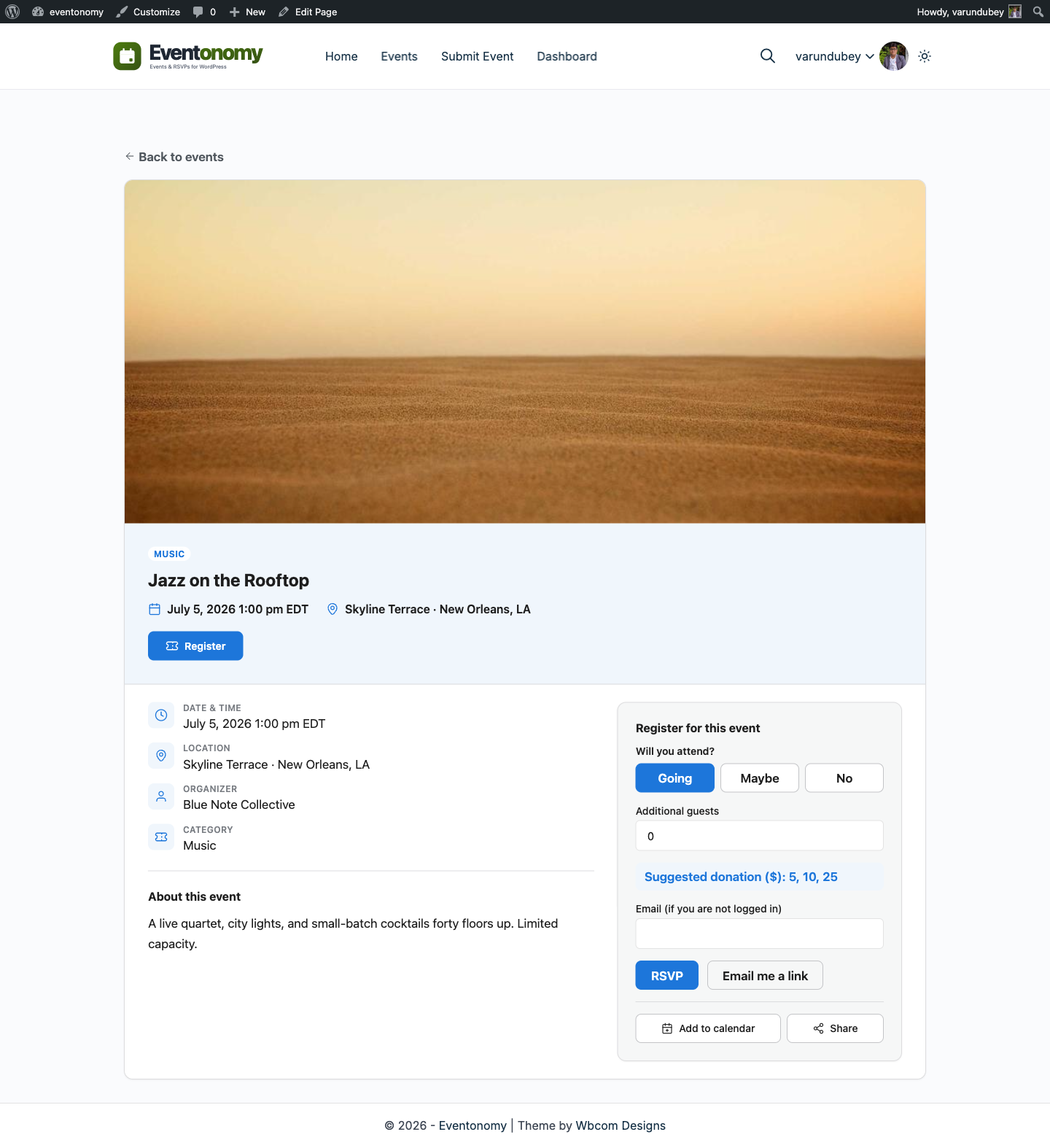
Going counts toward capacity, maybe and no do not. Each RSVP can add extra guests, and every guest counts toward the cap.
Features · RSVPs
The WordPress RSVP plugin guests can use without an account. Members answer in one click, guests answer with a name and an email, then manage their RSVP through a magic link. Capacity, waitlists, and custom questions are all free.
Statuses & capacity
Going counts toward capacity, maybe and no do not. Each RSVP can add extra guests, and every guest counts toward the cap.
Set a cap per event or a site-wide default. When the event fills, new RSVPs join the waitlist instead of bouncing.
On a free RSVP event, when someone changes going to no, the oldest waitlist RSVP is promoted automatically. The promoted attendee gets an email.
Guest RSVPs
Forcing account creation kills RSVP completion. Eventonomy emails guests a signed management link instead, so they can change or cancel later.
Name, email, and a status. No password, no signup form.
A signed link, valid for seven days, opens their manage-RSVP page.
They update or cancel any time and can re-request a fresh link from the RSVP block.
Prefer members only? Turn on "Require login to RSVP" and guests see a login prompt instead.
Custom questions
Turn on Custom questions in settings and you can add your own to the RSVP form with four answer types. Mark any one required and the form will not submit without it. It is in the free plugin, it just does not start switched on.
A single-line input for names, dietary notes, or plus-one details.
A multi-line textarea for longer answers.
A dropdown with options you define, one per line.
A yes or no toggle for consents and simple confirmations.
Answers land next to each RSVP, and organizers export an event's attendee list to CSV from the Manage Attendees view. See the Attendees & Orders docs.
Weddings & private events
A wedding RSVP is the same problem with higher stakes: meal choices, plus-ones, and relatives who will never create an account. Eventonomy covers all three out of the box.
Hosted service or plugin
A hosted service gives you a working event page in an afternoon and charges per event or per guest. A plugin puts the same page on a site you already run and charges once. Both do the job. Here is what the plugin route gives you that the hosted one cannot.
Who came last time is what makes the next event easier to fill. On a hosted page that list is theirs, and you get an export. Here it is a table in your own database.
The event page sits on your domain, so the link you share builds your site rather than somebody else's, and it is still there after the event.
Hosted tools price by event, guest count or both. A plugin is a one-time setup and the second event costs nothing, which is the whole argument if you run these regularly.
Pick the hosted route for a one-off on a site you do not have, or when you want it live today and the fee is not worth thinking about. Pick the plugin when you run events more than once, when the guest list is worth keeping, or when the event should live on your own domain. If your site is already WordPress, that second route is a block on a page.
Questions
If you already run a WordPress site, you add a page for the event and drop the RSVP block on it. That page is the event website: the date and place, the description, and a form that records who is coming, how many they are bringing, and anything else you ask. There is no separate site to build and no second place to check, because the answers land in the site you already run.
A hosted service is the faster start and the right call for a one-off, or when you have no website to put the event on. A plugin is the better economics once you run events more than once, because the setup is one time and the guest list stays in your own database rather than in an account you export from. If you already run a WordPress site, the plugin route is a block on a page you own.
Yes, and that is how it behaves out of the box. Somebody logged out answers with a name and an email. If that address already has an account on your site it is matched to it. If it does not, they are offered an account at that address, pre-ticked, and they can untick it. Switch "Offer an account at checkout" off and no account is ever created from an RSVP: those guests reach their RSVP through the link in their email instead. The opposite switch, "Require login to RSVP", blocks logged-out RSVPs entirely and shows a login prompt.
One gets it and the other lands on the waitlist. The seat is claimed atomically: the count is re-read and written under a locked event row, so the check and the booking cannot be separated by another request slipping between them. Nobody sees an error, and you do not find out you oversold when everyone turns up.
Yes, on a free RSVP event, and it moves by the number of seats actually freed rather than by one person. Somebody cancelling who was bringing two guests frees three seats, so the queue is walked until the next person in line no longer fits, and it stops there instead of skipping ahead to a smaller party. Everyone promoted gets an email, which is the difference between a working waitlist and a list nobody knows they are on. A paid ticket event is different: its waitlist never promotes anyone by itself, so nobody is admitted without paying.
Yes. When every ticket is gone, the registration panel offers Join waitlist instead of a dead end. A visitor gives a name and an email and pays nothing. The entry joins your attendee roster in queue order. You choose who gets a seat, because a paid event waitlist never promotes automatically. Switch it on with Waitlist when full in the Registration settings.
Yes, and it is in the free plugin, but it ships switched off. Turn on Custom questions in settings and you get four answer types: short text, paragraph, a dropdown of options you define, and a checkbox. Any question can be required, and the answers sit beside each RSVP in Manage Attendees.
Seven days by default, and the developer filter evnm_magic_link_ttl changes that either way. The same link is embedded in the confirmation email everyone receives, so a guest is not hunting for a button that disappeared once they answered, and they can request a fresh one from the RSVP block if it has expired.
Yes. Manage Attendees exports the event to CSV with the custom-question answers included, and orders export separately. Tokens and payment references are never written to the file.
Everything on this page. RSVP statuses, guest counts, capacity, waitlists that promote automatically on RSVP events, custom questions, RSVP deadlines, magic links, and reminders a day and an hour before the event are all in the free plugin. Pro adds ticket payments, QR check-in, reminder timing you choose yourself, and SMS.
Waitlists, guest counts, custom questions, and magic links all ship in the free plugin.