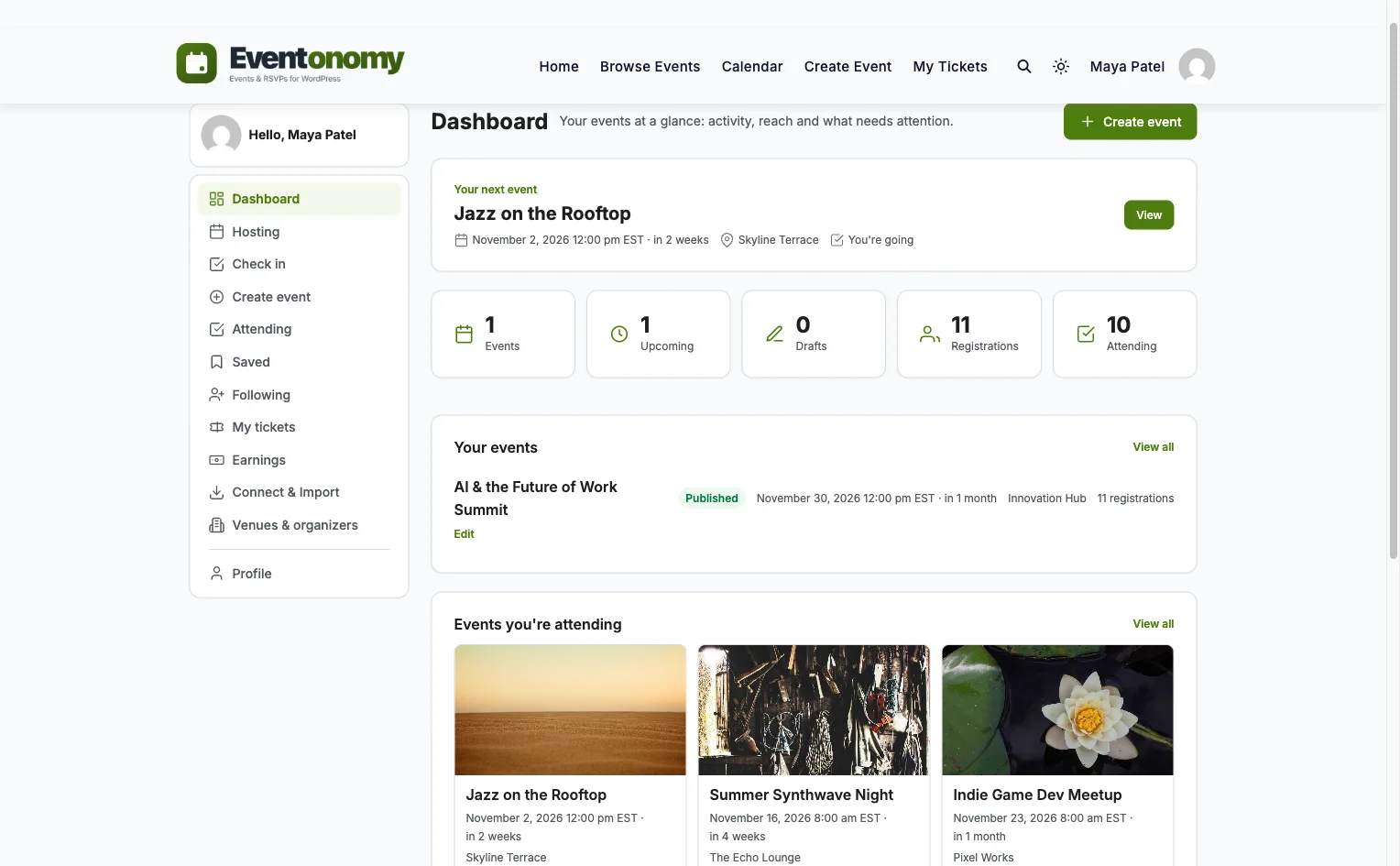
Run a programme of events without running yourself ragged.
Listing one event is easy. Managing forty of them across a year is the part that
eats a week a month: chasing organizers for dates, retyping the same venue,
remembering who is on the waitlist, sending the reminder nobody sent. Eventonomy
moves that work off your desk and onto the site.
Stop being the person who types in everyone else's event.
The reason event admin swallows time is rarely the events. It is that one person
holds the only login, so every date change routes through them.
Organizers, without wp-admin
Members create and edit their own events from the front end. Nobody needs a WordPress login handed to them, and you are not the bottleneck on every date change.
You, only where it matters
Front-end submission means the queue is events waiting on you, not events waiting on you to type them in.
Venues and organizers once
Both live in a shared catalog and get picked from a list, so the same hall is not spelled three ways across a season.
Duplicate instead of retype
An event can be duplicated outright, which is how most of next term gets built from last term.
The series
A schedule you set once, and correct one date at a time.
Repeats generate real occurrences
Daily, weekly and monthly series produce individual occurrences, each with its own page and RSVP list. Cancel the third Tuesday without touching the other eleven, and restore it if plans change back.
Advanced rules when you need them
Yearly series and rules like "second Saturday of the month" are in Pro, for the schedules that do not fit a simple repeat.
A calendar people can subscribe to
Month and list views (week and day in Pro), plus a feed, so attendees read the schedule in the calendar app they already use.
Attendees
The room fills itself, and the last seat only goes once.
Capacity that actually holds
The last seat is claimed atomically, so two people hitting register at the same moment cannot both take it. The loser lands on the waitlist rather than in a support ticket.
Waitlists that move by themselves
On a free RSVP event, somebody drops out and the next person takes the place without you brokering it.
Email everyone on one event
Send to every registrant of a single event from the manage-attendees panel, rather than exporting to a mail tool to say the room has changed.
Export the list
Attendees out as CSV when you need them somewhere else, with bulk actions for the rest.
Without being asked
The jobs you keep forgetting, done anyway.
Reminders, zero configuration
One day before and one hour before, out of the box, with no cron plumbing to set up. Custom timing is in Pro.
Confirmations on registration
A branded HTML confirmation goes out when somebody registers, without you watching the list.
One-click unsubscribe
Recipients can stop the mail themselves, which is the difference between a reminder and a complaint.
Moving in
Bring the calendar you already have.
The reason people stay on an event plugin they have outgrown is the migration, not
the plugin. So the importer is built to be reversible.
Five plugins, one click
The Events Calendar, EventON, Events Manager, WP Event Manager and Sugar Calendar, plus CSV and iCal.
Scan before it writes
The importer previews what it found first, so you see the damage before it happens rather than after.
Old links keep working
It leaves 301 redirects behind, so the event URL somebody pasted into a newsletter last year still lands.
Undo
If the result is wrong, the run can be reversed instead of unpicked by hand.
Weighing it against what you run now? The
comparisons go plugin by plugin, and
the plugin overview covers
choosing one in the first place.
Questions
Asked before switching.
How is this different from your WordPress event plugin page?
That page is for choosing a plugin. This one is for running a programme of events once you have chosen: who can create them, what repeats, who chases attendees, and what happens without anybody remembering to do it.
Can organizers manage events without a WordPress login?
They need an account on your site, but not access to wp-admin. Creating, editing and managing events all happen through the front-end editor and member dashboard.
Can people register without creating an account at all?
Yes, and without filling in a signup form. Somebody logged out registers with a name and an email. That email either matches a member you already have or mints an account for them, so they can find the event later and manage the registration through a magic link, which does not log them into your site. If you would rather store a name and email with no account attached at all, that is a setting you switch on. If you would rather nobody registered without logging in first, that is a different setting.
What happens when two people take the last seat at once?
Only one gets it. The seat is claimed atomically at the database level rather than checked and then written, so the second person lands on the waitlist instead of creating a double booking you find out about at the door.
Will it slow down as the calendar grows?
Events, RSVPs, venues and organizers live in their own database tables rather than as posts and post meta. That is the design decision that keeps the admin usable once a season is hundreds of events rather than a dozen.
I already run everything in The Events Calendar. Is moving realistic?
There is a one-click importer for it, and for EventON, Events Manager, WP Event Manager and Sugar Calendar. It scans and previews before writing, runs in the background, leaves 301 redirects so old links keep working, and can be undone.
Do I need BuddyPress?
No. Everything here works on a plain WordPress site. If you do run BuddyPress, Pro adds an events tab to groups and member profiles.
I've been developing a relatively complex website for my business, and my development experience is pretty limited. As expected, I ran into a number of difficulties, and ach time, the Wbcom team helped me resolve my issues quickly and patiently. I can't recommend their products and support enough!
Paris · NZ ·
Prompt and Professional Support
I recently had a fantastic experience with the Wbcom Designs support team. They were incredibly prompt, warm, patient, and friendly as they helped me resolve an issue with my website. I truly appreciate the complexity of troubleshooting website-related issues, as each one is unique, and users often…
Boris Petrov · TH ·
Great support
Great support; the issue was resolved perfectly well.
Fast Incorporated · NG ·
Fantastic 6 star support
Fantastic 6 star support. I wanted to setup a membersite and tried many solutions. I contacted Wbcom for BuddyX and tried the theme with Buddypress. I am not a webdesigner or a coder, but had a requirement that was not standaard. I contacted WBcom and Pallavi helped me from start to finish with…
Hubert · IT ·
Great way of support
Great way of support! Thanks a lot! Direct responding, open for questions and very fast to the right solution!
Ron Henkes, training en begeleiding · NL ·
Fast Respond & Troubleshooting With…
Fast Respond & Troubleshooting With technical insight
Kevin Tan · MY ·
Quick response
Quick response. Solve my problem
Steve Wen · CA ·
just wanted to let you know how pleased…
just wanted to let you know how pleased I am with his work. Shasank was easy to work with and his communication skills were excellent. Please reward him for being a fine employee. Wayne Francis
Wayneo · US ·
Outstanding Service and Exceptional Support from Wbcomdesigns Team
I have already purchased themes and plugins worth over ₹65,000 from wbcomdesigns, and my experience has been nothing short of amazing. Their support is exceptional. Both Shivani Kashyap and Camilia Scott provide incredibly fast responses and have resolved any issues I encountered with my website…
Tushar Garg · IN ·
These guys are absolutely amazing
These guys are absolutely amazing. Such a quick turn around. Their support is second to none.