My Events Dashboard
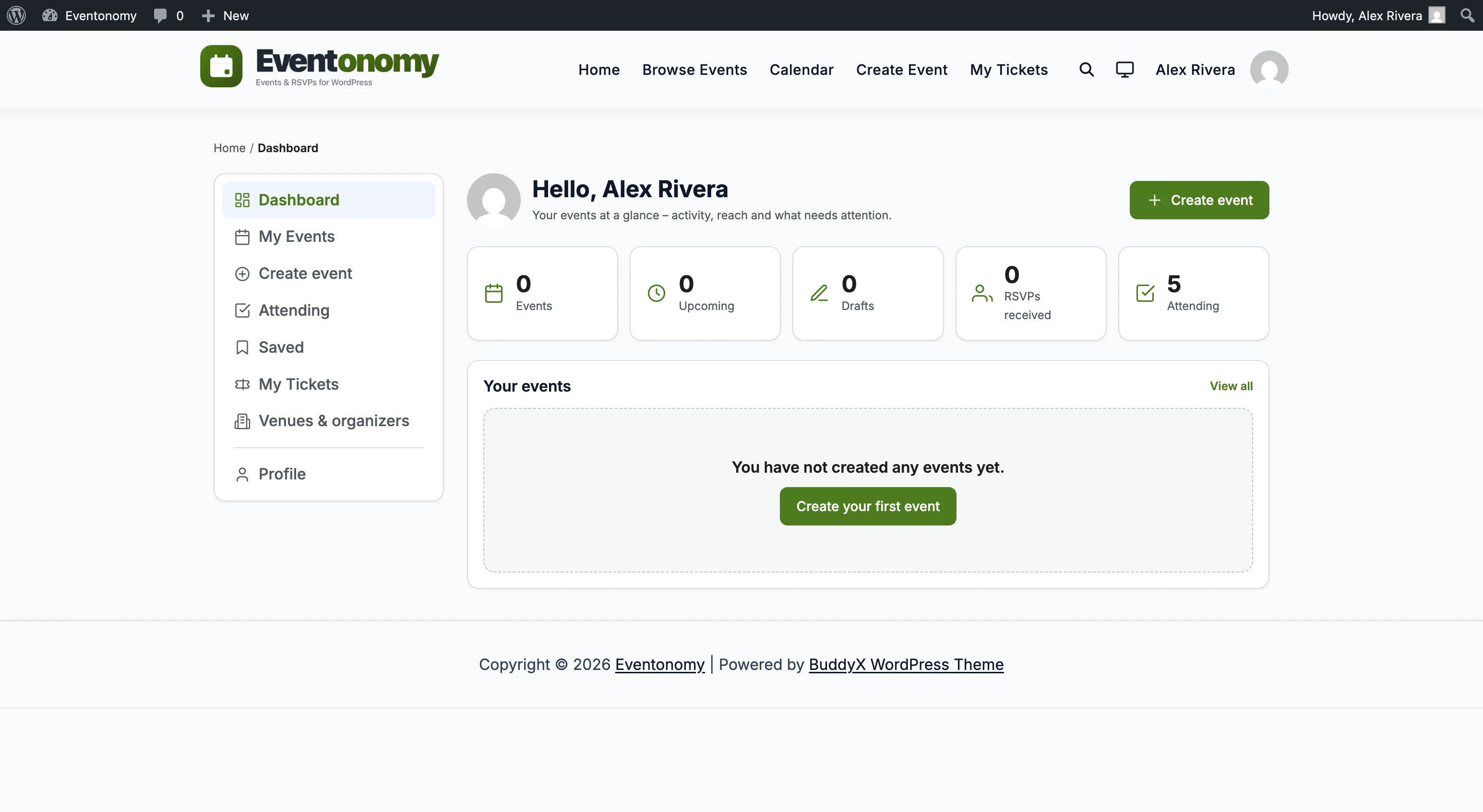
The member dashboard at /manage-events/ is a left-nav hub that brings everything an organizer or attendee needs into one connected page. Sections are routed server-side via ?evnm_section= - the URL is deep-linkable and works without JavaScript.
What You Will Learn
- Every section in the dashboard and what it contains
- How to navigate between sections
- What Pro adds to the dashboard navigation
- How to link directly to a specific section
Dashboard Setup
The member dashboard is powered by the eventonomy/my-events block. During activation, Eventonomy creates a page titled Manage Events at /manage-events/ and places this block on it automatically. You do not need to configure it.
Why
/manage-events/? The obvious name for this page - "Dashboard" at/dashboard/- is one of the most commonly used page slugs on WordPress. Membership plugins, LMS plugins, and many themes create their own/dashboard/page, and two pages cannot share one slug. To avoid that clash on a fresh install, Eventonomy uses the distinct/manage-events/slug.Upgrading an existing site? Your current dashboard page is left exactly as it is - Eventonomy never renames or moves a page you already have. So an older install may still serve this dashboard at
/dashboard/(or, on very early installs,/my-events/). Whatever your page's address is, the block and every?evnm_section=link below work the same way; just substitute your own page URL for/manage-events/.
If the page was deleted or the block was removed:
- Create a new page (e.g.
/manage-events/). - Add the Eventonomy My Events block.
- Publish the page.
That is all there is to it. Eventonomy finds the dashboard by looking for the page that holds this block, so there is no dashboard URL field in Settings to point at it. (The Event URLs card on Settings → Setup controls single-event and archive URLs only - see Permalinks Settings.)
Navigation
The left sidebar shows the sections available to the current member. Non-logged-in visitors see a "Please log in to manage your events" notice.
Members who do not have the event creation capability (controlled by the Creator role setting) do not see the Create event item. They can still open Edit on an event they already own, because editing your own event is not the same permission as creating a new one.
Sections
Dashboard (Overview)
The default landing section when a member visits /manage-events/.
Stat cards - five counts pulled from the database in a single batch query:
| Card | What it counts |
|---|---|
| Events | Total events the member has created (all statuses). |
| Upcoming | Published events with a future occurrence. |
| Drafts | Events the member has saved as drafts. |
| Registrations | Total registrations across all the member's events. |
| Attending | Events the member has RSVP'd to. |
Your next event spotlight - the member's soonest upcoming published event, showing:
- Date and a relative "in N days / Tomorrow / Today" label.
- Venue or city (shown as "Online" for virtual events).
- Current RSVP count and capacity fill percentage.
- Links: View, Manage attendees, Edit.
Recent events - a short list of the member's most recently active events.
My Events
A full list of all events the member has created, with lifecycle tabs to filter by status.
Lifecycle tabs:
| Tab | Shows |
|---|---|
| All | Every event regardless of status. |
| Draft | Saved but not yet submitted. |
| Pending | Submitted and awaiting admin approval. |
| Published | Live and visible to the public. |
| Past | Published events whose occurrence has already happened. |
| Cancelled | Cancelled events. |
Per-event actions (from each row):
- View - opens the single-event page.
- Edit - opens the event editor for that event.
- Manage attendees - opens the attendee management surface for that event (attendee table, exports, and the Email attendees panel).
- Duplicate - creates a fresh draft copy and opens it in the editor (shown when the member can create events). See Managing Events.
- Cancel - changes the event status to Cancelled (only available on pending, published, and private events).
Each row also shows a location label (venue name, city, or "Online") and the event's RSVP/capacity fill.
Create Event
The frontend event editor (eventonomy/event-editor block) embedded within the dashboard shell. Creating and editing both live here - the same source of truth for the event form.
To edit an existing event, click Edit on any event row in My Events. The URL becomes /manage-events/?evnm_section=create&event_id={id}.
Attending
A paginated list of events the current member has RSVPs for.
The list is filtered server-side to the member's own RSVPs. Each row shows the event title, date, and the member's current RSVP status:
- Going - confirmed attendance.
- Maybe - tentative.
- Waitlist - on the waitlist; promoted automatically when a Going spot opens.
Each row also carries a Cancel registration action, so a member can cancel a registration directly from the dashboard without opening the event page. Cancelling a Going RSVP frees its seat and promotes the oldest waitlisted attendee automatically, exactly as cancelling from the event page does.
Venues & Organizers
A lookup section backed by the shared venue and organizer catalog. Members can browse venues and organizers they have used in their past events. This section is useful for finding and reusing catalog entries when creating a new event.
Profile
Sits below a separator at the bottom of the left nav, and is available to every logged-in member whether or not they organize events. It holds two cards.
Profile - the member's public identity, so they never have to go into wp-admin to change it:
| Field | Notes |
|---|---|
| Read-only. Changed through the normal WordPress account screens. | |
| Display name | The name shown on events they organize and, where enabled, in the who's-going list. |
| Bio | Free text. |
| Website | A link shown with their profile. |
Billing & invoice details - the address that appears on the member's receipts and invoices. It is stored on the WordPress user account (on the standard WooCommerce billing_* fields), so one saved address is reused everywhere and the member fills it in once:
First name, Last name, Company, GST / VAT number, Street address, Apartment/suite, Town / City, State / County, Postcode / ZIP, Country, Email, Phone.
Company and GST/VAT number are optional and exist for members who need them printed on the invoice. The country list is the complete ISO country set.
Saved (Pro)
Pro - This section requires Eventonomy Pro.
A list of events the member has saved by clicking a Follow Button block with objectType = event. Each entry links to the event page and includes a Remove action to unfollow.
The section fetches the member's event follows from GET /eventonomy/v1/follows?object_type=event, then batch-resolves event details via GET /eventonomy/v1/events?include[]= - no N+1 queries.
My Tickets (Pro)
Pro - This section requires Eventonomy Pro.
A list of the member's orders in all statuses - not just paid. Each row shows:
- Order number as the primary line (e.g.
ORD-10001). - Event title as a secondary link to the event page.
- When - order date.
- Ticket breakdown - e.g. "2× General Admission, 1× VIP Seating".
- Status chip - a colored chip: Paid (green), Pending (amber), Refunded (grey), or Cancelled.
- Total - the currency-formatted order total.
A View ticket button appears on paid and pending orders. It links to ?evnm_section=tickets&evnm_order=<id> - staying on the My Tickets tab and rendering the order-confirmation card with the per-attendee QR ticket(s).
Data comes from GET /eventonomy/v1/orders scoped to the current member, rendered client-side.
Connect & Import (Pro)
Pro - This section requires Eventonomy Pro.
Lets a member pull events in from a calendar they already keep elsewhere, instead of retyping each one. The section appears only when the site owner has left member self-service on (Settings → Connections → Calendar Sync) and the member is allowed to create events.
Connect a calendar - the form at the top of the section:
| Field | What to enter |
|---|---|
| Source | iCalendar URL or Eventbrite (your account). |
| Calendar URL | For an iCalendar source: the calendar's public .ics address (for example a Google Calendar's public iCal address). |
| Eventbrite private token | For an Eventbrite source: the member's own Eventbrite private token, entered as a masked field. There is no Eventbrite login step. |
| Keep in sync | How often the calendar re-syncs: Every hour, Every day, Every week, or Every month. |
Preview reports how many events would be imported without changing anything. Import & sync imports them and puts the calendar on the chosen schedule.
Your connected calendars - the list below the form shows each calendar the member has connected, with its sync frequency and a "Last synced" time (nothing is shown until the first sync runs). Each row has:
- Sync now - runs that calendar immediately instead of waiting for the schedule.
- Remove - disconnects the calendar. Events it already imported stay in place.
Good to know:
- Imported events belong to the member who connected the calendar, and go through the site's approval queue like any other submission if the site reviews member events.
- Re-syncing a calendar updates the same events rather than creating duplicates.
- An Eventbrite token is encrypted before it is stored and is never returned by the API or shown back to anyone, including the site owner.
- Eventbrite is an API connection, not an iCalendar feed. Meetup is not supported in this release.
For the full feature walkthrough, see Calendar Sync.
Order confirmation card
When the dashboard loads with ?evnm_order=<id>, a prominent confirmation card renders at the top of the main column, above the dashboard header. This is where a signed-in member lands after checkout, from any gateway, instead of a scattered per-gateway thank-you page.
A buyer who was not signed in lands on their order page at /order/<token>/ instead. Checkout creates an account but does not sign anyone in, so this is the normal path for a first-time buyer - sending them here would have shown them a login form immediately after paying. The order page carries the same event, tickets, QR codes and invoice link, needs no account, and the order still appears on this dashboard once they sign in.
The card is authorized to the viewer's own order (matched by user ID or account email). A guessed order ID for someone else's order renders nothing.
It has three states, driven by the order status:
| State | Shows |
|---|---|
| Confirmed | "You're registered for {Event}" with the order number, date, and venue, plus a per-attendee QR ticket for each seat. |
| Pending | "We're confirming your payment…" - tickets are suppressed until payment clears. |
| Refunded | "This order was refunded" - tickets are suppressed. |
Each attendee's QR code is filled by Pro's QR service (the slot stays empty on Free alone, which ships no scanner). The same confirmation email goes out either way, and it carries the order-page link - so a buyer who closes the tab can always get back to their tickets.
Linking Directly to a Section
Use the evnm_section query parameter to deep-link to any section:
| URL | Opens |
|---|---|
/manage-events/ |
Dashboard (overview) |
/manage-events/?evnm_section=events |
My Events |
/manage-events/?evnm_section=create |
Create event |
/manage-events/?evnm_section=attending |
Attending |
/manage-events/?evnm_section=places |
Venues & organizers |
/manage-events/?evnm_section=profile |
Profile and billing details |
/manage-events/?evnm_section=manage |
Manage attendees (contextual - reached from an event's "Manage attendees" action) |
/manage-events/?evnm_section=saved |
Saved (Pro) |
/manage-events/?evnm_section=tickets |
My Tickets (Pro) |
/manage-events/?evnm_section=connect-import |
Connect & Import (Pro) |
/manage-events/?evnm_order={id} |
Dashboard with the order-confirmation card at the top |
To link to a specific event's editor: /manage-events/?evnm_section=create&event_id={id}.
Extending the Dashboard
Pro adds sections by hooking two Free seams:
evnm_dashboard_nav(filter) - append a nav item by slug.evnm_dashboard_section(action) - render the body for a Pro-registered slug.
See the Extending Eventonomy guide for details.